> ## Documentation Index
> Fetch the complete documentation index at: https://langchain-5e9cc07a-preview-docsfl-1776371397-e812a24.mintlify.site/llms.txt
> Use this file to discover all available pages before exploring further.
# Sandbox templates
> Define container images, resource limits, and configuration for sandboxes using templates.
Sandboxes are in private preview. APIs and features may change as we iterate. [Sign up for the waitlist](https://www.langchain.com/langsmith-sandboxes-waitlist?ref=docs.langchain.com) to get access.
Before creating a sandbox, you need a **template**. Templates define the blueprint for sandbox instances, including the container image, resource allocation, and optional configuration like volumes and auth proxy rules.
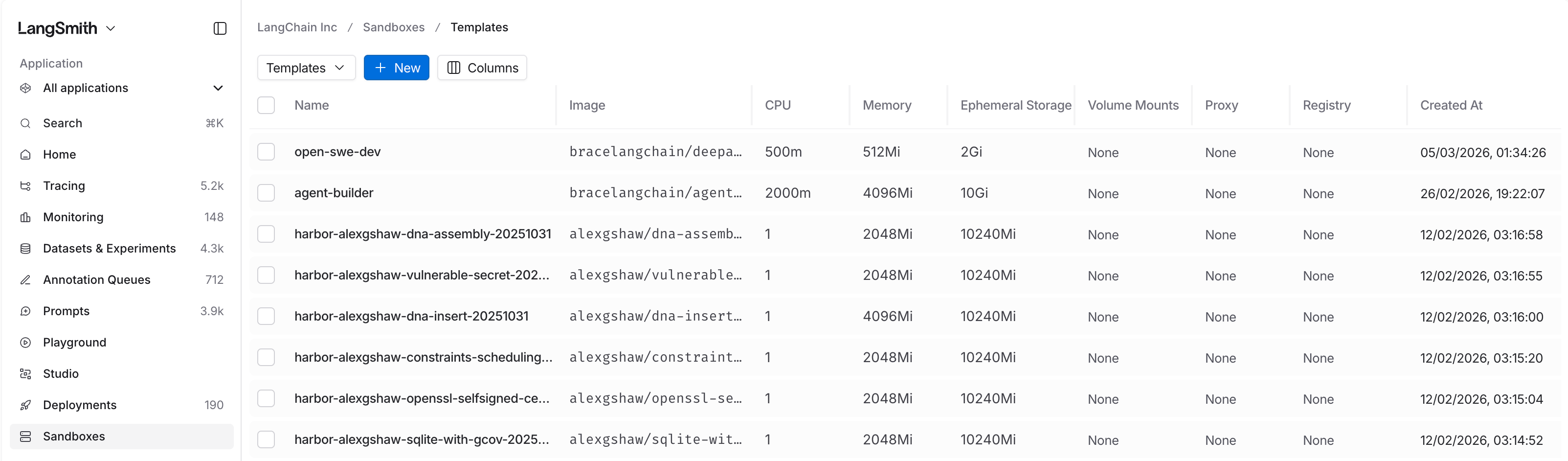 ## What templates define
| Setting | Description |
| --------------------- | --------------------------------------------------------------------------------------------------------------- |
| **Container image** | The Docker image to use (private registries are supported) |
| **Resource capacity** | CPU, memory, and storage limits |
| **Volumes** | Persistent storage to attach (optional) |
| **Auth proxy config** | Rules for injecting secrets into outbound requests (optional) — see [Auth proxy](/langsmith/sandbox-auth-proxy) |
## Create a template
```python Python theme={null}
from langsmith.sandbox import SandboxClient
client = SandboxClient()
client.create_template(
name="python-sandbox",
image="python:3.12-slim",
)
```
```ts TypeScript theme={null}
import { SandboxClient } from "langsmith/experimental/sandbox";
const client = new SandboxClient();
await client.createTemplate("node-sandbox", {
image: "node:20-slim",
});
```
You can also create templates via the REST API with full control over resources and proxy configuration:
```bash theme={null}
curl -X POST "$LANGSMITH_ENDPOINT/api/v2/sandboxes/templates" \
-H "x-api-key: $LANGSMITH_API_KEY" \
-H "Content-Type: application/json" \
-d '{
"name": "python-sandbox",
"image": "python:3.12-slim",
"resources": {"cpu": "500m", "memory": "512Mi", "storage": "2Gi"}
}'
```
## Next steps
* [Create a sandbox](/langsmith/sandbox-sdk) from your template
* [Configure auth proxy rules](/langsmith/sandbox-auth-proxy) to inject secrets into outbound requests
* [Set up warm pools](/langsmith/sandbox-warm-pools) to pre-provision sandboxes for faster startup
***
## What templates define
| Setting | Description |
| --------------------- | --------------------------------------------------------------------------------------------------------------- |
| **Container image** | The Docker image to use (private registries are supported) |
| **Resource capacity** | CPU, memory, and storage limits |
| **Volumes** | Persistent storage to attach (optional) |
| **Auth proxy config** | Rules for injecting secrets into outbound requests (optional) — see [Auth proxy](/langsmith/sandbox-auth-proxy) |
## Create a template
```python Python theme={null}
from langsmith.sandbox import SandboxClient
client = SandboxClient()
client.create_template(
name="python-sandbox",
image="python:3.12-slim",
)
```
```ts TypeScript theme={null}
import { SandboxClient } from "langsmith/experimental/sandbox";
const client = new SandboxClient();
await client.createTemplate("node-sandbox", {
image: "node:20-slim",
});
```
You can also create templates via the REST API with full control over resources and proxy configuration:
```bash theme={null}
curl -X POST "$LANGSMITH_ENDPOINT/api/v2/sandboxes/templates" \
-H "x-api-key: $LANGSMITH_API_KEY" \
-H "Content-Type: application/json" \
-d '{
"name": "python-sandbox",
"image": "python:3.12-slim",
"resources": {"cpu": "500m", "memory": "512Mi", "storage": "2Gi"}
}'
```
## Next steps
* [Create a sandbox](/langsmith/sandbox-sdk) from your template
* [Configure auth proxy rules](/langsmith/sandbox-auth-proxy) to inject secrets into outbound requests
* [Set up warm pools](/langsmith/sandbox-warm-pools) to pre-provision sandboxes for faster startup
***
[Edit this page on GitHub](https://github.com/langchain-ai/docs/edit/main/src/langsmith/sandbox-templates.mdx) or [file an issue](https://github.com/langchain-ai/docs/issues/new/choose).
[Connect these docs](/use-these-docs) to Claude, VSCode, and more via MCP for real-time answers.